The business operating system for owners and operators.

Get your business out of your head and into an operating system your team can actually run.

Structure responsibilities, recurring work, people, processes, training, and delegation in one place — then open one view each day to see who’s doing what, when it needs to happen, and what matters most.

Now launching — Founding Member access available.

Early customers get introductory pricing while we build alongside the first group of businesses.

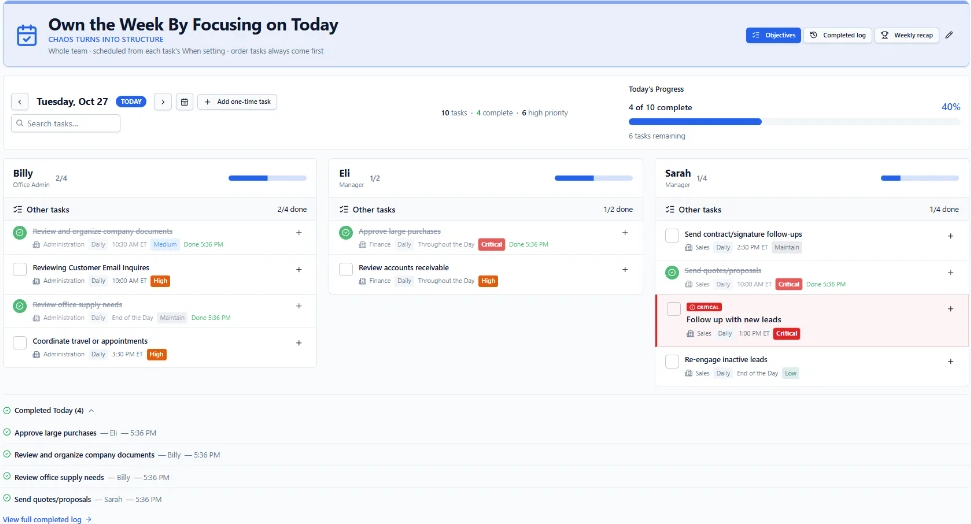
Chaos Controller Today view showing each person's responsibilities, priorities, and daily progress
A personal plan for every person.
Today view with each person's own task column — Billy, Eli, and Sarah — showing responsibilities, priorities, schedules, and live progress
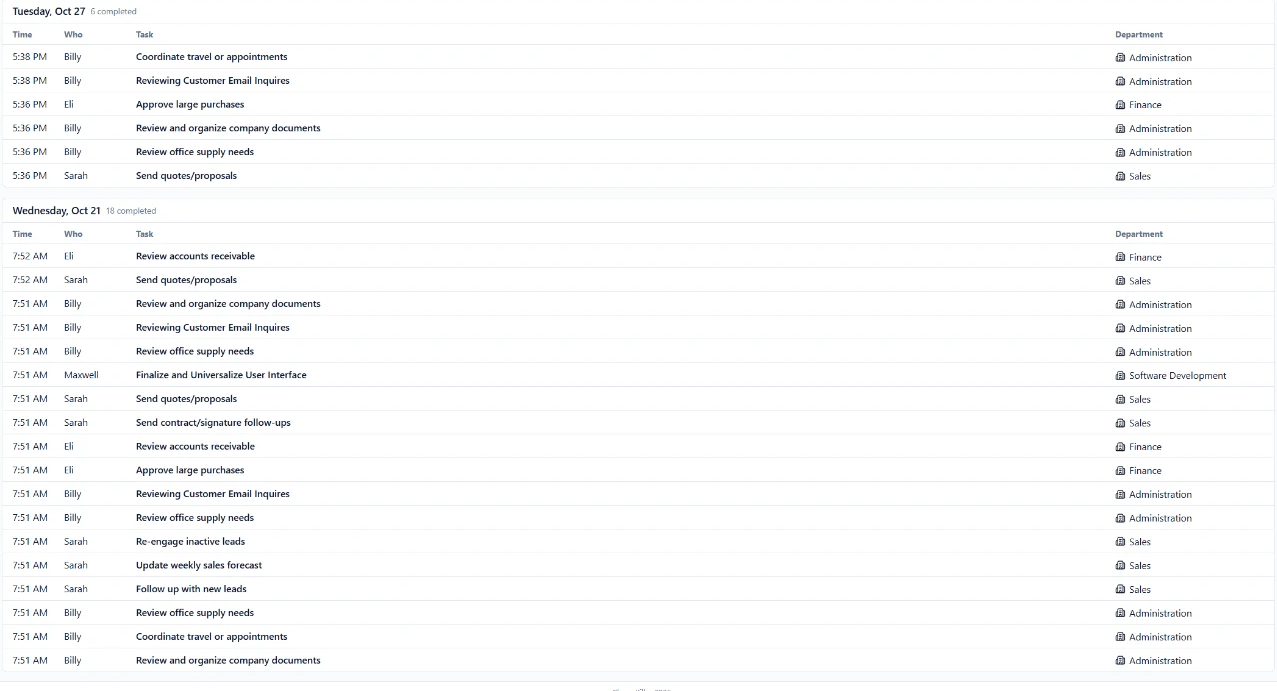
Know what’s getting done.Completed log
Completed log recording who finished each task, when, and in which department

A real operating system. For Real Businesses.

The problem

Your business shouldn't depend on you remembering everything.

As a business grows, the owner often becomes the system.

You remember what needs to happen. You know who should be doing it.

You know which tasks happen every Monday, which orders happen every Thursday, which employee knows which process, and which things still need your approval.

The problem is that the system exists mostly inside your head.

Then the business grows.

  • More employees.
  • More departments.
  • More recurring responsibilities.
  • More things to forget.
  • More questions coming back to you.

Chaos Controller gives that structure somewhere to live.

How it works

Map your business. Let the operating system organize the work.

  1. 01

    Create your departments.

  2. 02

    Add the responsibilities that keep each department running.

  3. 03

    Assign the right person.

  4. 04

    Choose when the work needs to happen.

  5. 05

    Add instructions, SOPs, training, files, or resources.

  6. 06

    Chaos Controller turns it into the daily work your team sees.

You define the operation. The system handles the organization.

Watch it work

See Chaos Controller in action.

A 6-minute walkthrough from the founder showing how easy it is to setup, the Today Tab, the Business Playbook, and Analyze & Optimize work together.

Today page

Everyone knows what they need to do today.

Your employees shouldn't need to ask: “What am I supposed to work on today?” Their Today page already tells them.

Recurring responsibilities automatically appear on the correct day, assigned to the correct person. One-time work appears alongside it.

Complete the task and the system records it. Tomorrow, the business keeps moving.

Priorities

Being busy isn’t the same as working on what matters.

Placing a critical vendor order might matter more today than cleaning up a spreadsheet. Following up with a major customer might matter more than an internal administrative task.

Your team shouldn’t have to guess. The system makes priorities visible so everyone knows what deserves their attention.

  1. 01What needs to happen.
  2. 02Who owns it.
  3. 03When it needs to happen.
  4. 04What matters most right now.

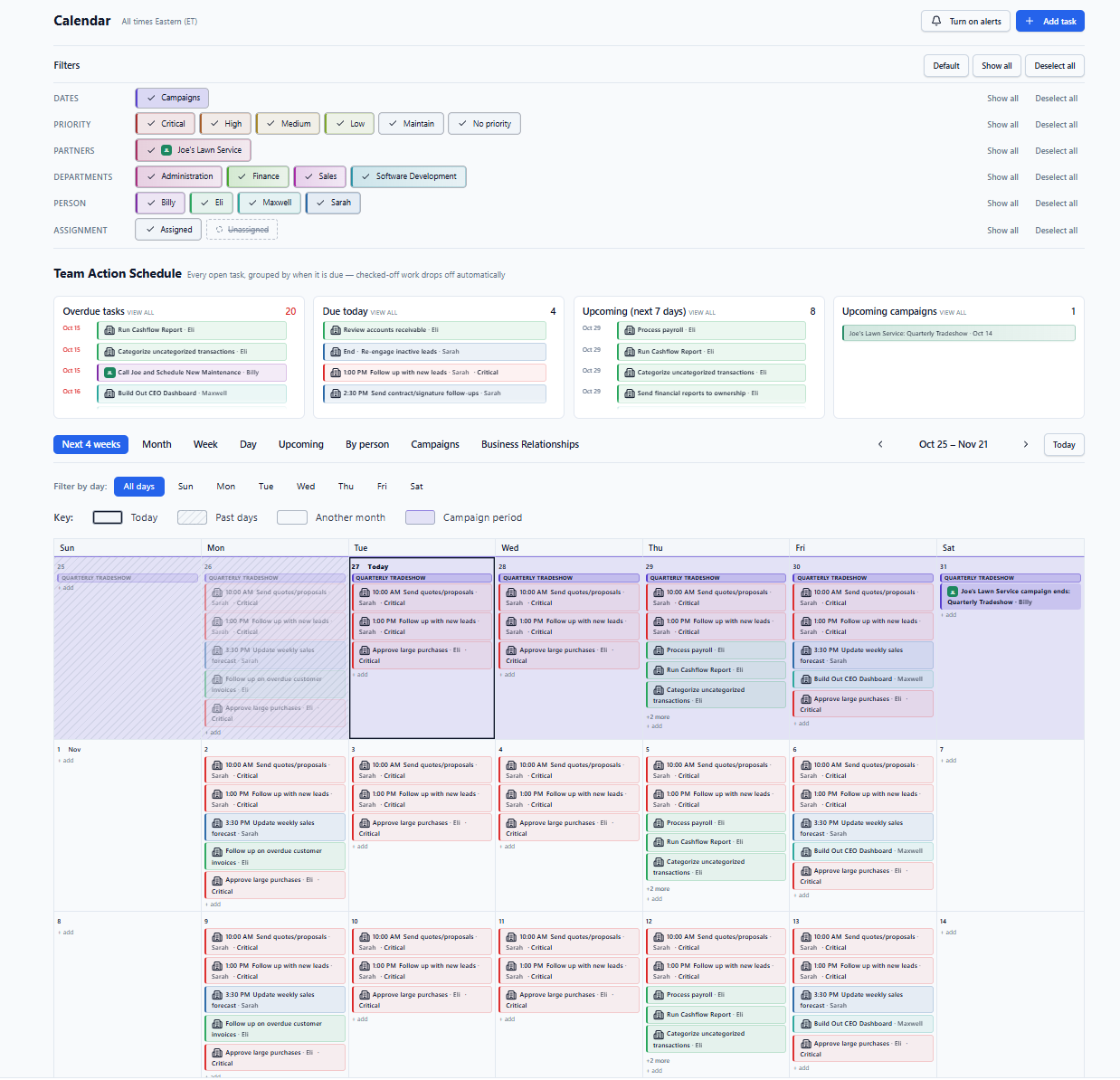
Calendar

Your calendar builds itself from the way your business operates.

Instead of manually creating events, Chaos Controller uses the schedules already attached to your responsibilities. Then filter the view to exactly how you want to see it — by priority, department, person, assignment, partners, or campaigns — and the calendar updates in real time.

A task happens every Monday?

A vendor order happens on the 15th?

A monthly review belongs to an employee?

CalendarOct 25 – Nov 21
Calendar month view showing recurring tasks placed on the correct days with priorities, departments, and owners attached
Due today. Nothing to schedule.
Due today list showing the tasks that need to happen today, each with an owner and priority

You never build the calendar. You define the work.

Overdue, due today, and upcoming — grouped automatically, with each task's priority, department, and owner still attached. The filter bar narrows the view to exactly what you want to see in real time, down to the person, department, or priority.

Team

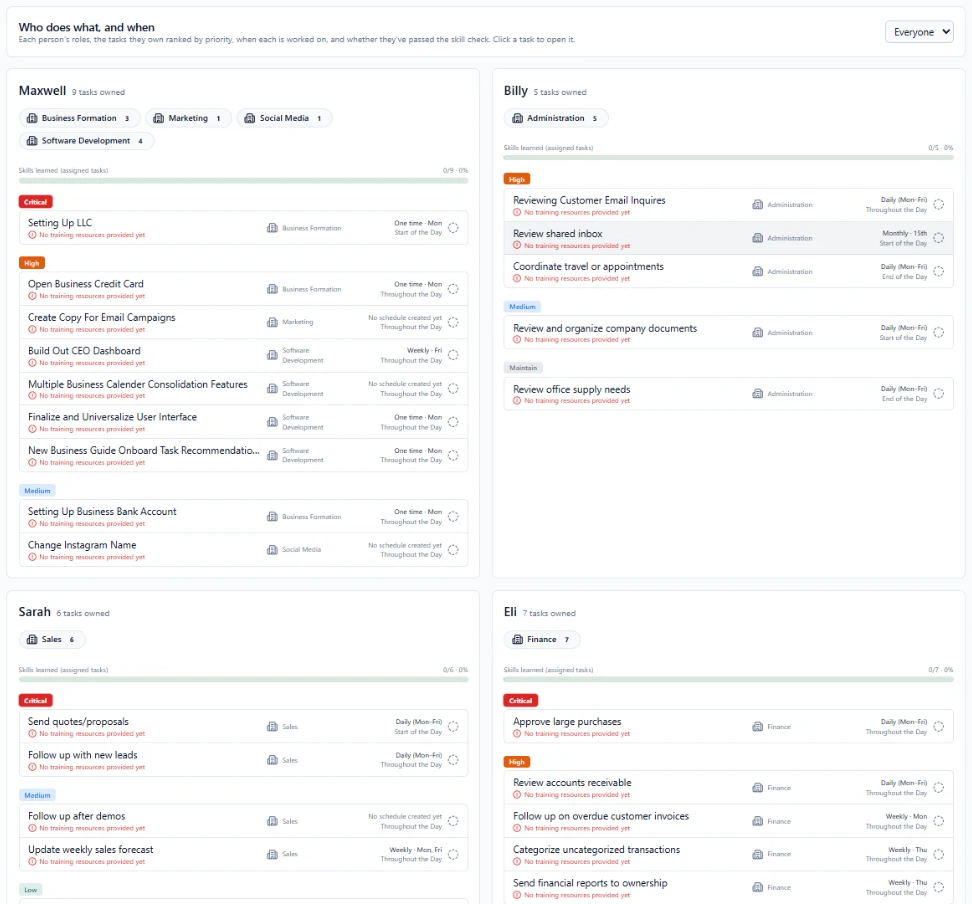
Who does what, and when.

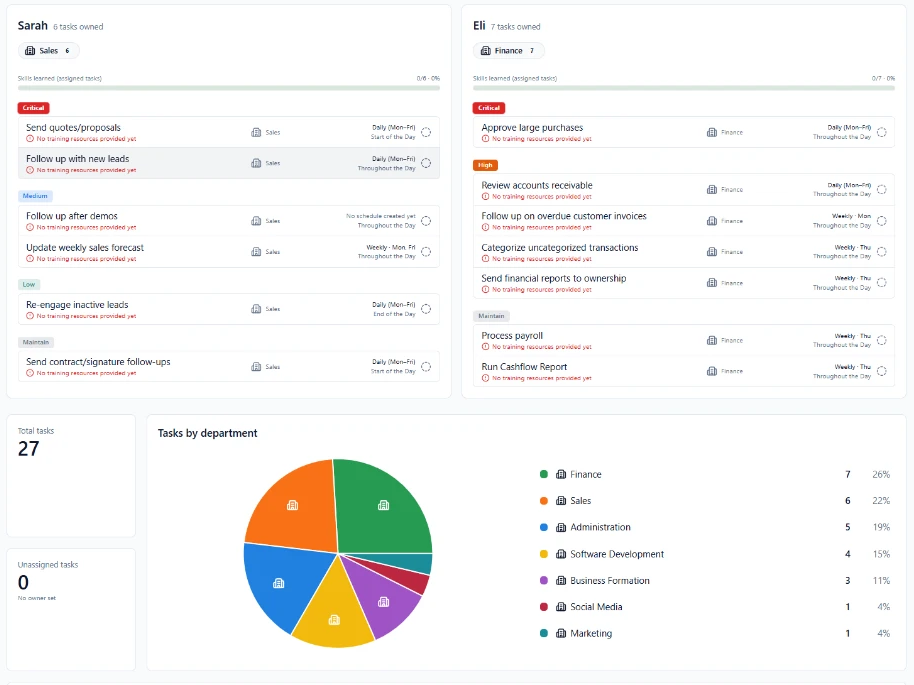
Open one view and see every person’s roles: the tasks they own ranked by priority, the department each belongs to, when each one is worked on, and whether training is assigned to the task — so you know what’s ready to delegate and what isn’t.

Who does what, and whenEveryone
Team view showing Sarah's Sales and Eli's Finance tasks ranked by priority with schedules and training status
Every responsibility has a name attached.
Eli's Finance responsibilities listed with priority badges, departments, schedules, and training status

Each person’s roles live in one place.

Tasks grouped by priority, the department each belongs to, when it happens, and whether training is assigned to the task — you can see at an admin level if it's ready to delegate properly, or still missing the training it needs. No asking, no guessing.

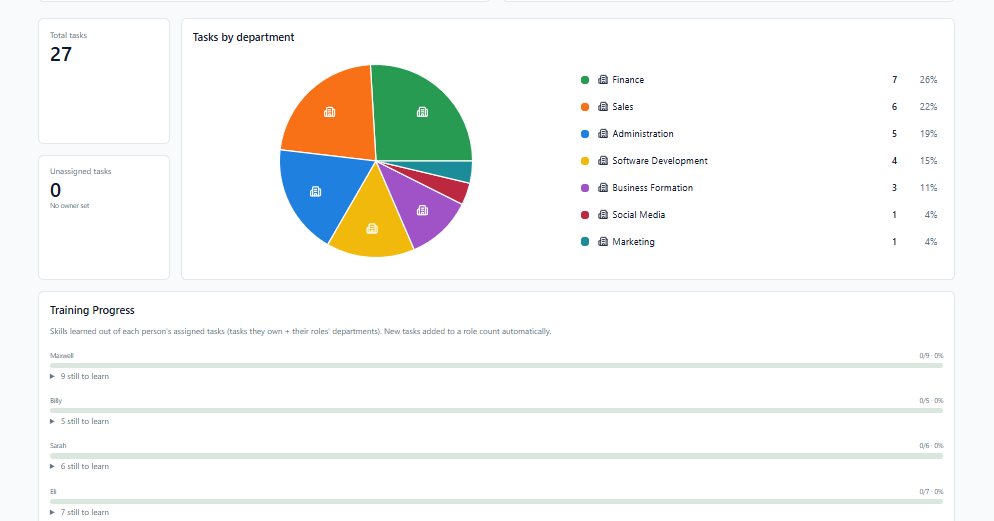
Where the work livesDepartments & training
Tasks by department pie chart and training progress showing how the workload spreads across departments and where employees still need training

Owner dependency

See what your business still depends on you for.

Most business owners know they're doing too much. They just don't know exactly how much.

Chaos Controller makes it visible.

Instead of feeling overwhelmed, see exactly where the dependency exists — then remove it one responsibility at a time.

  • How many responsibilities exist across the business
  • How many are delegated
  • How many you still own
  • Which departments rely heavily on you
  • Where responsibilities have no owner
  • Where processes are undocumented
  • Where employees still need training

You own the business. You shouldn’t have to own every task.

Which tasks truly require the owner? Which could be delegated? Which lower-value tasks are taking time away from growing the company? When you can see where your time goes, it becomes easier to give the right work to the right people.

Knowledge

Don't just assign the task. Attach the knowledge.

Delegation breaks when someone knows what to do but not how. Every responsibility can become its own operating workspace.

  • SOPs
  • Instructions
  • Training
  • Videos
  • Files
  • Screenshots
  • Resources
  • Company knowledge

Your knowledge stops living across random documents, messages, bookmarks, and people's memories.

Give your team direction without constantly looking over their shoulder.

Employees shouldn’t have to wait for you to tell them what’s next. And you shouldn’t have to send the same video, document, or instruction every time a task comes up. They can open the system, see their work, access the knowledge they need, and get to work.

Less asking. Less reminding. Less hovering. More ownership.

Grows with you

Start simple. Build deeper when you need it.

Want a smarter recurring task system?

Do that.

Want employees to open it every morning and see today's work?

Do that.

Want to document SOPs later?

Add them later.

Want departments, training, roles, and deeper accountability?

The system grows with you.

You don't need to install your entire business in one afternoon. Start with what needs to happen next.

Analyze & Optimize

Your business, from a different point of view.

What needs attention, why it matters, and what you can do about it. The software organizes the facts — you make the decisions.

Analyze & OptimizeBusiness health
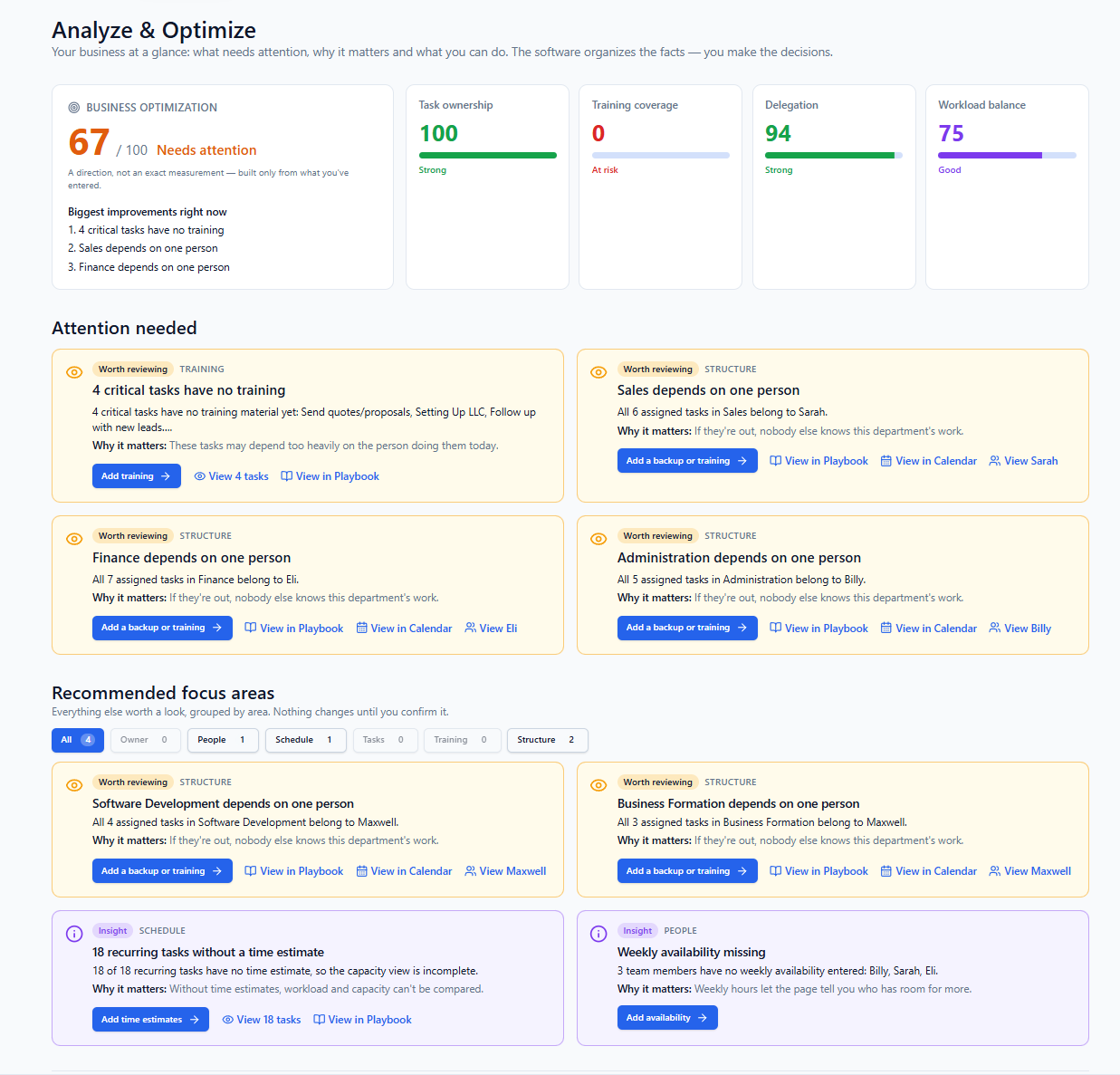
Analyze and Optimize dashboard showing a business optimization score of 67 out of 100, task ownership, training coverage, delegation and workload balance, and the items that need attention
Biggest improvements right now.
Business optimization card: a score of 67 out of 100 needing attention, with the biggest improvements — four critical tasks have no training, Sales depends on one person, Finance depends on one person

Every number comes from what you already entered.

Owners, schedules, training, and workload — the system reads the structure you created and shows you where it’s thin.

100

Task ownership

Strong

94

Delegation

Strong

70

Workload balance

Good

0

Training coverage

At risk

  • 4 critical tasks have no training material yet.
  • All 7 assigned tasks in Finance belong to Eli.
  • All 6 assigned tasks in Sales belong to Sarah.
  • All 5 assigned tasks in Administration belong to Billy.

That isn't another AI chatbot giving generic advice. It's your business explaining itself back to you based on the structure you created.

The difference

Not another project-management tool.

Project-management software helps you manage projects. Chaos Controller is designed around something different:

How does your business operate repeatedly?

  • Who owns each responsibility?
  • When does it happen?
  • How does it get done?
  • Who knows how to do it?
  • What does each employee need to accomplish today?
  • What still depends on the owner?

One system for the whole business

Everything your business needs to stay organized, delegated, and moving.

Chaos Controller brings your people, recurring work, schedules, training, business knowledge, priorities, and operational visibility into one place — so you can stop running the company from memory.

The core of the system

Know exactly what needs to happen today.

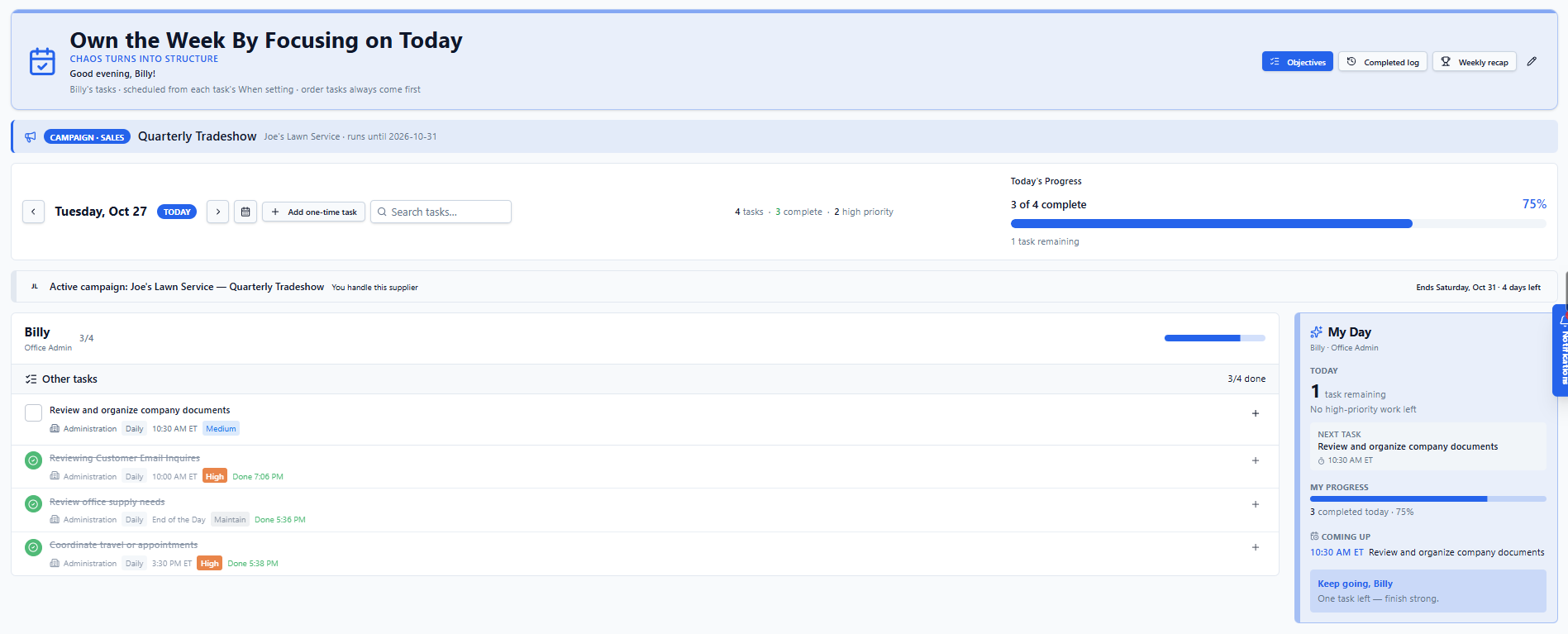
Every person opens one view each morning and sees their own work: priorities first, departments attached, due times visible. Owners see the whole company's day; employees see their own. Complete the task right there, and the completed log keeps the record.

Today
Today view showing Billy's task list with priorities and due times, today's progress bar, and the personal My Day panel

Set the work once. Chaos Controller brings it back when it needs to happen.

Turn your business into a visible schedule.

The calendar builds itself from the schedules attached to your responsibilities. Filter by employee, department, priority, or assigned versus unassigned work. Campaigns and relationship follow-ups land on their own days.

Calendar
Calendar month view with recurring tasks placed automatically, each carrying its owner, department, and priority

Once your business is mapped, your calendar becomes a live picture of what is supposed to happen.

Turn responsibilities into repeatable processes.

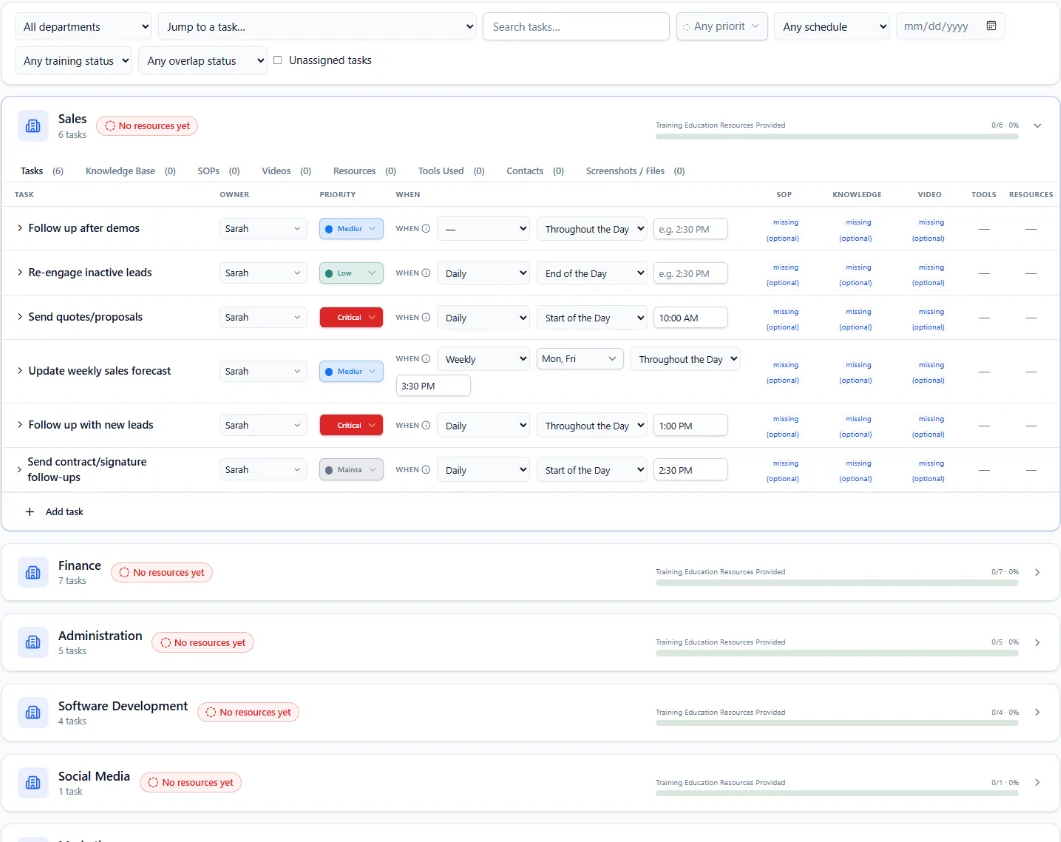
Every responsibility can carry its own instructions: written steps, videos, Loom or YouTube links, screenshots, and documents. Employees open training straight from the work they own, and you can see what's learned and what isn't.

Business Playbook & Training
Business playbook showing each department's tasks with owners, priorities, schedules, SOPs, knowledge, videos, and training resources attached

Assign it. Teach it. Verify it.

See where the business is strong — and where it is fragile.

A business score, task ownership, training coverage, delegation, workload balance, key-person risk, schedule conflicts, and recommended focus areas — all read from the structure you already entered.

Analyze & Optimize
Analyze and Optimize dashboard showing the business optimization score, ownership, training coverage, delegation, workload balance, and what needs attention

It doesn't just show you the work. It helps you understand the structure behind the work.

Running the team

See who owns what across the business.

Every person's departments, responsibilities, and training progress in one view. Spot where one person carries too much, and give every responsibility a clear owner.

Stop wondering who handles something.

Keep important business knowledge from disappearing.

General company knowledge, tool training for QuickBooks, Google Drive, and your industry software, and resources linked straight to the tasks and departments they belong to. Team members mark what they've learned.

Stop letting employee questions disappear into texts and conversations.

Questions are organized by department, tracked open or answered, and kept as a record — so recurring confusion becomes visible instead of forgotten.

If a question matters to the business, it should not disappear.

See what changed and what actually got done.

Completed work, task changes, role changes, new resources, and updates to responsibilities — one log of what's happening. Not surveillance. Operational clarity.

When someone is unavailable, the work doesn't disappear.

Mark a person out of office, see the responsibilities affected, and reassign what still needs to happen. People take days off. The business still needs to run.

Organize work across every location.

Main office, warehouse, store, job site, or remote — attach people and responsibilities to where the work happens, so you know not just who owns it, but where it happens.

Running the business

Never forget the relationships your business depends on.

Customers, vendors, suppliers, carriers, contractors, accountants — attach recurring follow-ups to any relationship, and they appear for the right person on schedule.

Joe's Lawn Service. Follow up every 30 days.

Manage the work that only matters for a certain window.

Trade shows, seasonal promotions, product launches, inventory counts, compliance periods — give a campaign a start date, an end date, and an owner, and its work flows into the right person's Today view.

Run more than one business without juggling multiple systems.

Each company keeps its own people, departments, tasks, calendar, and structure — switching updates the whole workspace.

One owner. Multiple businesses. One operating system.

Make the most important parts of the business impossible to ignore.

Mark a department as priority — finance, customer service, shipping, sales — and its work gets extra visibility inside everyone's Today view while it matters most.

Making it easy

Build the first version of your system in minutes.

Answer a few questions about your company, team, departments, and common responsibilities, and Chaos Controller suggests a starting structure. You review it and personalize it around how your business actually works.

You know your business. Chaos Controller helps you organize it.

Build the system as quickly as you can explain it.

Describe a task, note, or process out loud instead of typing it. Capture responsibilities the way you'd explain them to a person.

Employees see what they need. Owners see the whole business.

Individual users stay focused on their own work, while owners and managers keep full visibility across the company.

Build Chaos Controller around your business — not the other way around.

Custom departments, responsibilities, locations, priorities, and schedules. A mechanic shop doesn't operate like an accounting firm — and neither should its software.

You already know how your business works. Put it somewhere your team can see it.

Map the people, responsibilities, schedules, training, and knowledge behind your business — then let Chaos Controller help keep everything moving.

No APIs. No complicated setup. Start with how your business already works.

Why I built this

I built this because I had the same problem.

The founder in his warehouse, standing beside a wrapped pallet of inventory and holding a stretch-wrap roll
Built by an operator, not from the sidelines.

I’ve spent the last several years operating and growing an e-commerce business. As the company grew, so did the departments, employees, processes, and responsibilities I was managing.

Daily checks. Weekly vendor orders. Monthly reviews. Follow-ups and employee training. Small tasks that were easy to forget but still mattered.

The bigger the business became, the more of it I was carrying around in my head.

I tried spreadsheets, documents, training videos, calendars, and different software for different parts of the business.

They all helped with individual pieces. But nothing gave me one clear view of how the business actually operates.

So I built one.

Your business is an engine.

An engine works because every component does its job at the right time. Your business works the same way: departments, people, and hundreds of small actions keep it moving. You shouldn’t have to keep track of the entire engine yourself.

Chaos Controller gives you the operating system behind it.
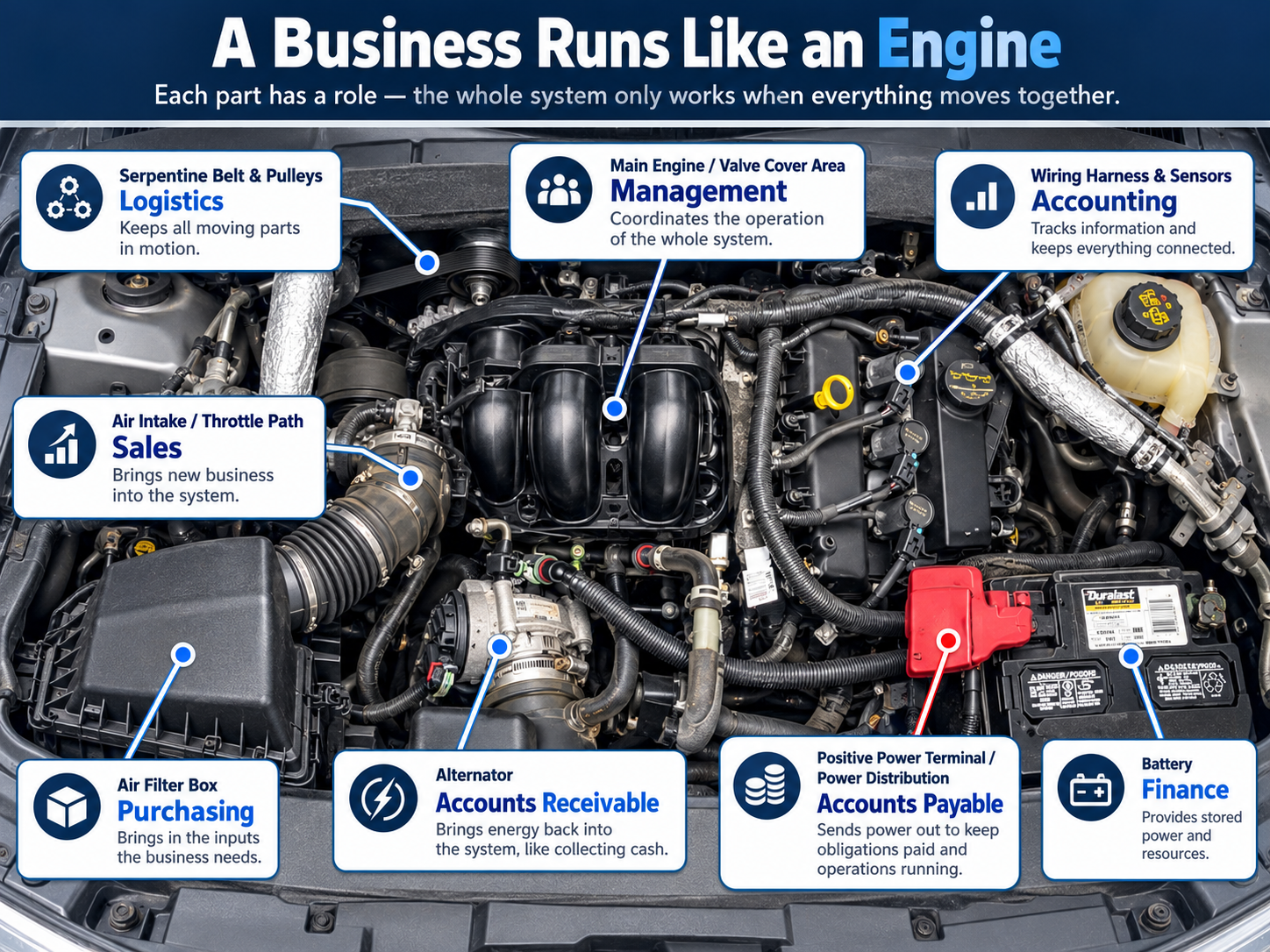
Infographic: a car engine bay where each part maps to a business function — logistics, sales, purchasing, accounts receivable, accounts payable, finance, accounting, and management

Pricing

Simple plans that grow with your business.

Every plan is 30% off monthly at launch, and yearly takes an extra 44% off the regular annual price. The savings below compare your launch deal with regular pricing.

Locked in for life. Sign up during launch and your launch rate stays with you — the price you join at is the price you keep, forever, as our thanks for being here at launch. When regular pricing goes up for everyone else, it never does for you.

Solo

1 user

For owner-operators getting their business out of their head and into a system.

$49/mo regular price

$34/mo

30% off regular monthly pricing

Billed monthly at the launch rate.

  • ✓Today Page
  • ✓Calendar
  • ✓Recurring Responsibilities
  • ✓Business Playbook
  • ✓Knowledge Base
  • ✓Auto Setup
  • ✓Voice-to-Text
  • ✓Campaigns
  • ✓Business Relationships
  • ✓Locations
  • ✓Priority Departments
  • ✓Notifications
  • ✓Activity & completed-task history
  • ✓Analyze & Optimize
Get Started
Most popular

Team

Up to 5 users

For small teams that need delegation, accountability, training, and visibility.

$99/mo regular price

$70/mo

30% off regular monthly pricing

Billed monthly at the launch rate.

  • ✓Everything in Solo
  • ✓Employee accounts & user permissions
  • ✓Team dashboard with owner visibility
  • ✓Departments & delegation
  • ✓Employee Today pages
  • ✓Employee training progress
  • ✓Message Board
  • ✓Out-of-office & task reassignment
  • ✓Owner dependency, workload & contribution insights
Start With Team

Business

Up to 20 users

For larger teams running more of the business through Chaos Controller.

$199/mo regular price

$140/mo

30% off regular monthly pricing

Billed monthly at the launch rate.

  • ✓Everything in Team
  • ✓Up to 20 users
Get Started
FeatureSoloTeamBusiness
Included with every plan
Today Page✓✓✓
Calendar✓✓✓
Recurring Responsibilities✓✓✓
Business Playbook✓✓✓
Knowledge✓✓✓
Auto Setup✓✓✓
Voice-to-Text✓✓✓
Campaigns✓✓✓
Business Relationships✓✓✓
Locations✓✓✓
Priority Departments✓✓✓
Analyze & Optimize✓✓✓
Unlocked with a team
Team Members—✓✓
User Permissions—✓✓
Delegation—✓✓
Team Dashboard—✓✓
Employee Training Progress—✓✓
Message Board—✓✓
Out-of-Office Reassignment—✓✓
Team Workload Insights—✓✓
Owner Dependency Insights—✓✓
Users120

Every plan keeps the full core of the system. You upgrade when your business has grown and you need more people inside it — not because features were taken away.

Put the business somewhere other than your head.

Stop running your business from memory.

Get the tasks out of your head and the knowledge out of scattered documents. Give your team clear ownership. See what matters today. Know what’s still dependent on you.

And create a business that knows how to operate even when you're not personally directing every moving piece.